Fourteen screens, one press.
This is the actual product, in the order you meet it. One form with three numbered steps — what to search for, who you are, and the button — where the first two each save under a name of their own, and a search profile is any pairing of them. Everything after that button — driving the register, reading what it catches, ranking the set, writing the report and sending it — happens without you.
What one press does
Four legs, in order, unattended.
Nothing here is a queue you check back on. The run drives each leg into the next and stops on the first one that cannot proceed, telling you which and why.
- 01
Scrape
Driving the live register search in a headless browser, then chunking and embedding what it catches.
- 02
Corpus search
Matching the stored corpus against every discipline and past project on the profile.
- 03
Analysis & ranking
Assessing each tender against the profile, then ranking the whole set in one pass.
- 04
Report email
Rendering the PDF and sending it with a covering note.
The third leg is two passes, and the difference matters. Each tender is first assessed on its own, against your company profile and nothing else. Then the whole set goes into a single second pass that re-judges every score with the others in view — which is the only reason the numbers in the report can be compared with each other at all.
Step one
A search profile is two saved halves.
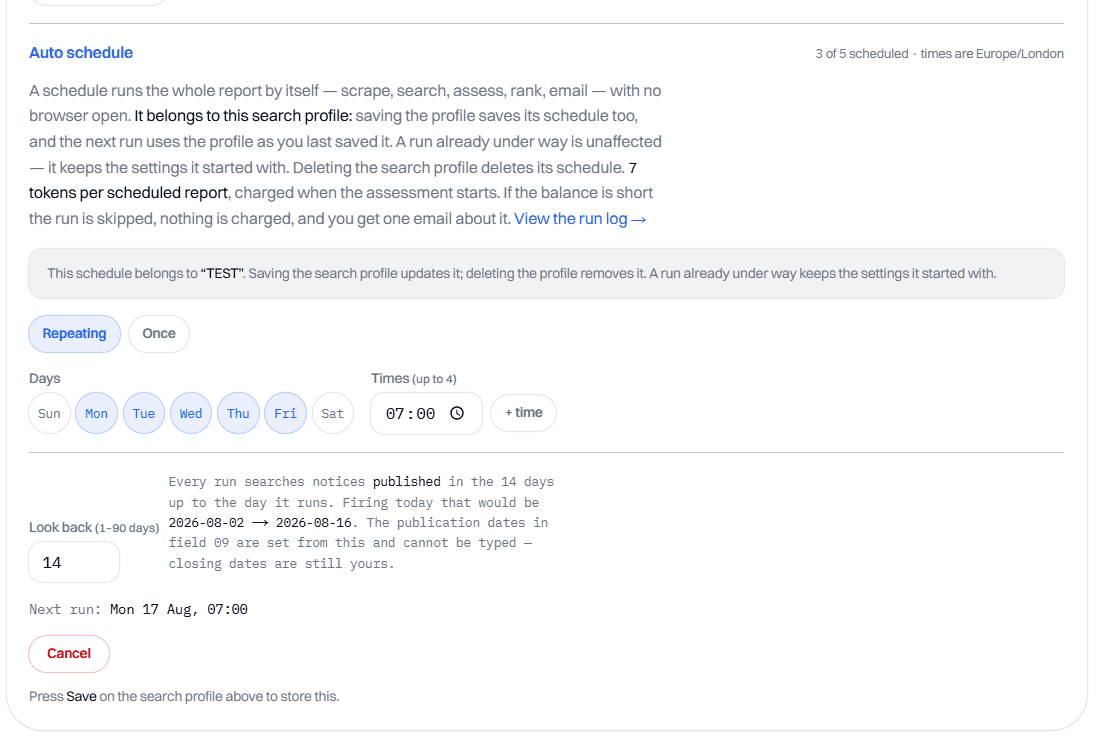
Pick a saved search configuration and a saved company profile, name the pairing, and give it a schedule if you want one. Keep as many of each half as you like; up to 25 pairings, of which any 5 may carry a schedule.
Pair the two halves and name it
The card at the top of the desk is the whole of it. Two pickers — ① Search configuration and ② Company profile — load a saved half each into the steps below, and naming the result files the pairing. Save as new stores it under the name you type; Save to puts your progress back onto a search profile you already keep. Loading one puts every field back exactly as you left it, so a search you tuned in March is one click away in June rather than something you reconstruct from memory.
A configuration per patch you chase, a company profile per entity you bid as, and a pairing for each combination that earns one. Neither half is capped. The pairings are: 25 saved, of which any 5 may carry a schedule. The counter in the corner of the card tells you where you are against both, before you hit either.
A pairing is stored as a copy of both halves rather than as a link to them, and that is deliberate. Editing a configuration later does not silently rewrite the search profiles built from it — which matters most when one of them is scheduled to spend your tokens at seven in the morning. The other side of the same coin: deleting a configuration cannot break a saved search profile or its schedule.
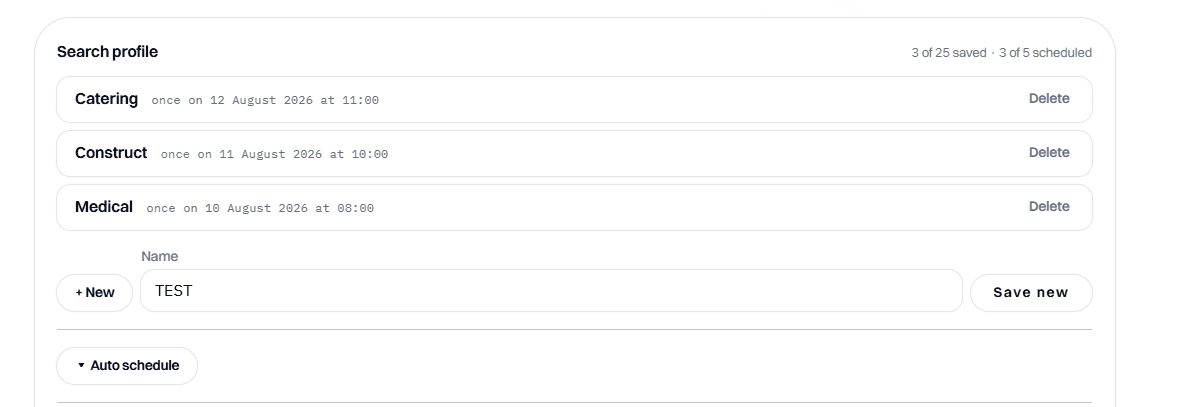
And give it a schedule
Auto schedule opens inside the search profile card, and that is the point rather than a layout accident. A schedule belongs to the pairing above it — not to either half on its own — and is saved in the same movement. There is no second place to go, and no way to end up with saved filters whose schedule quietly failed to write. Deleting the search profile deletes its schedule with it.
Repeating or once, up to 4 firings a day. The look-back window is the field that matters: 1 to 90 days, 14 by default. Every firing searches the notices published in that many days up to the day it runs, recomputed each time. That is why it takes the publication dates over from you — a schedule saved in March with two fixed dates in it would go on searching March forever, arriving empty every morning and looking like it worked.
A firing costs 7 tokens against 5 for a run you press yourself. Miss a week and you get one run, not seven: the next firing is worked out from now rather than from the one that was missed.
Step two
Fill in the two halves.
9 filter fields over one of two public registers, then the company they get judged against. Each half saves under its own name and can be reused in any pairing. The bureau tells you which filters the register you picked actually supports, rather than quietly ignoring the rest.
One desk, two registers
The whole run is one page. Below the search profile card sit three numbered steps — the search configuration, your company profile, the button — and nothing else to find. There is no queue, no inbox and no second screen.
Your token balance sits in the masthead, so the price is on screen before the button is. Nothing on this page can spend it by accident.
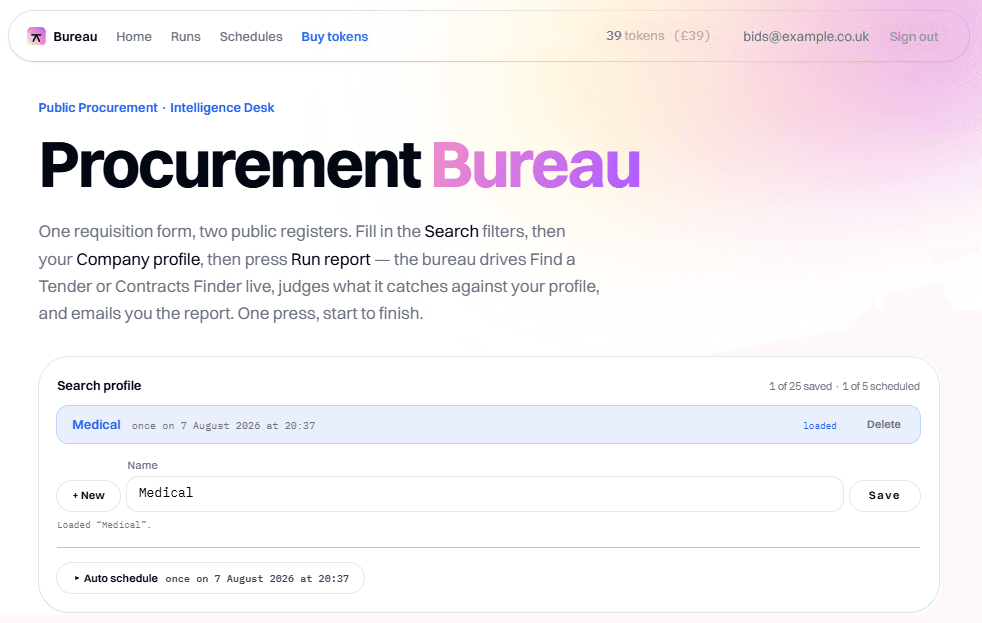
Pick the register, then the filters
Step ① is the search configuration: the register, the filters, and one category. It saves under its own name, so the filters you tuned for roadworks in the North West are a pick from a list rather than something you retype to run them against a second company profile.
One register per run — Find a Tender for everything published under the Procurement Act 2023, or Contracts Finder for the legacy register and award history. Then keywords, procurement stage and notice type.
The two registers are not equivalent and the form says so. Notice type — the UK1 to UK17 forms — exists only on Find a Tender, because Contracts Finder classifies by procurement stage alone. If every option you chose for a field is unsupported on the register you picked, the run reports that the filter was not applied. It never drops one silently and lets you believe it searched.
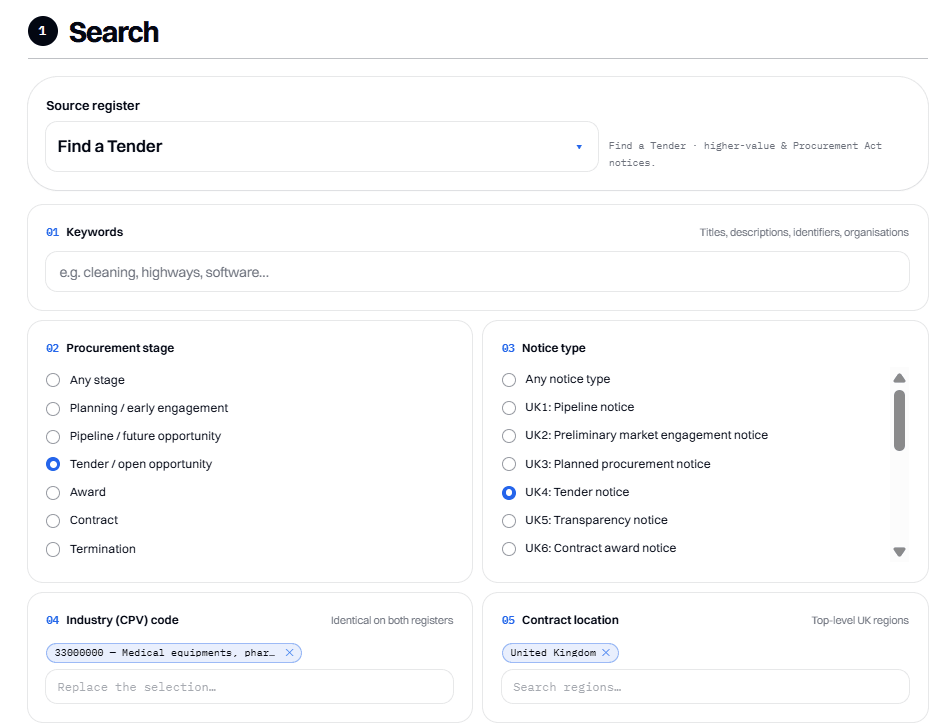
Narrow it to your patch
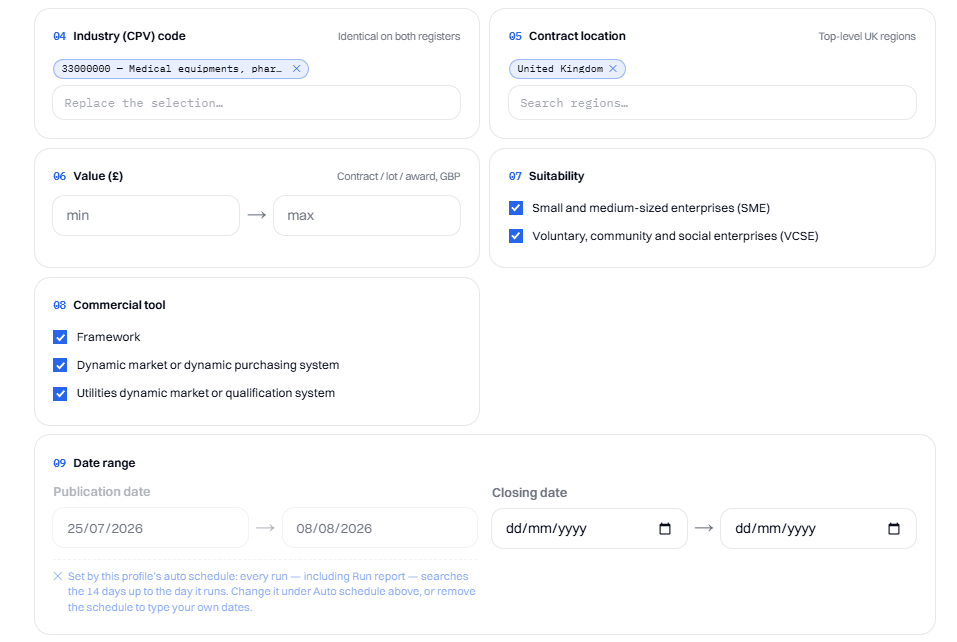
45 industry (CPV) divisions, identical on both registers. 17 UK regions. A value band, SME and VCSE suitability, and the commercial-tool filter for frameworks and dynamic markets — that last one is Find a Tender only.
Publication and closing dates are the last field. Note what the screenshot says under it: once a search profile carries a schedule, the publication window stops being something you type. The schedule computes it on every run instead — step 02 above.
Describe the company once
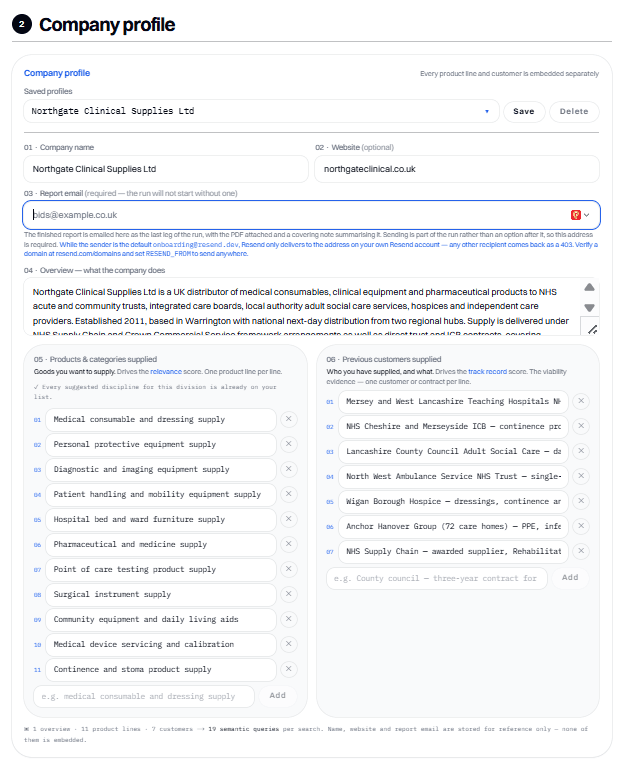
Step ② is the company profile, and it saves under its own name too — which is what “once” means here. Describe the company one time and pair it with every search configuration you keep; describe a second entity if you bid as more than one.
Your name, your website, and the address the report is sent to — the run will not start without that last one. Then the part that does the work: an overview of what the company does, the product lines or disciplines you supply, and the customers or projects you have delivered.
Each line becomes its own search. One overview plus eleven product lines plus seven customers is nineteen separate semantic queries, and the footer of that panel counts them for you. They are embedded separately rather than blended into one vector on purpose: an embedding of a mixed passage lands somewhere between its parts and matches neither of them well.
The split is also what produces the two scores you see later — your product lines drive relevance, your past customers drive track record. Name, website and report email are stored for reference and never embedded.
Search the archive, not just the portal
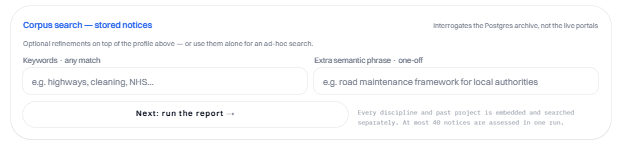
Every notice the bureau has ever caught for your account is chunked, embedded and kept. This panel interrogates that archive rather than the live portals, so a keyword leg and a semantic leg run together and notices matched by both rank first.
You can use it as a refinement on top of your company profile, or on its own for an ad-hoc search with no scrape at all. At most 40 notices go forward to assessment in one run — the highest-scoring ones, and the run tells you if it had to drop any.
Step three
Then press it.
One button, and the four legs above run end to end without you. A schedule set in step 02 presses the same button at seven in the morning, for the same result.
One press, start to finish
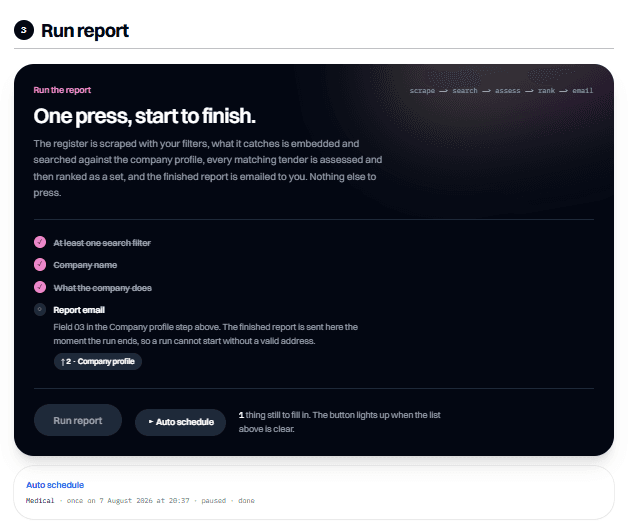
Four things have to be true before a run can start: at least one search filter, a company name, something about what the company does, and a report email. The panel lists them and strikes through the ones you have done.
A disabled button that will not say why is the worst thing a two-step form can do, so this one explains itself and links straight to the field that is missing. When the list is clear, the button lights up.
Step four
What actually lands.
An email you can act on from the preview pane, and a report underneath it that holds the reasoning. Both are produced from the same run — no second pass, no separate charge.
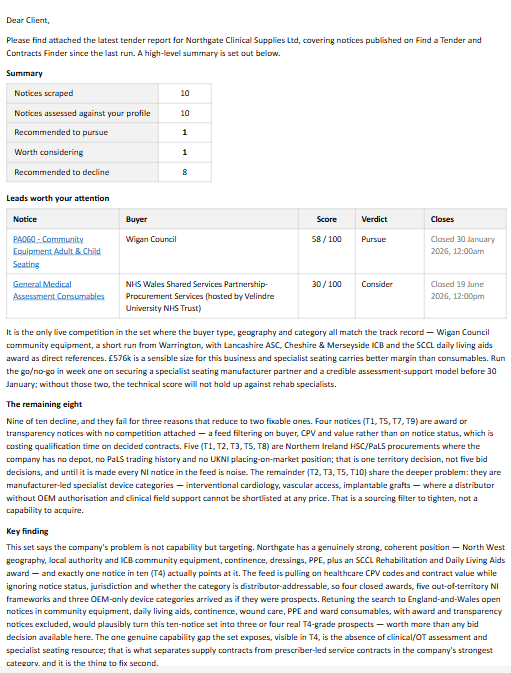
The covering email
Five rows of summary — scraped, assessed, pursue, consider, decline — then the leads worth your attention with a score, a verdict and a closing date each. Then, in prose: why the top pick is the top pick, why the rest were declined, and the one finding that cuts across the whole set.
It is written to be read on a phone without opening the attachment. Plain white, no card, no accent bar: this is transactional post, not a campaign, and it should look like it. The PDF rides along attached; a .docx is a download from the workspace.
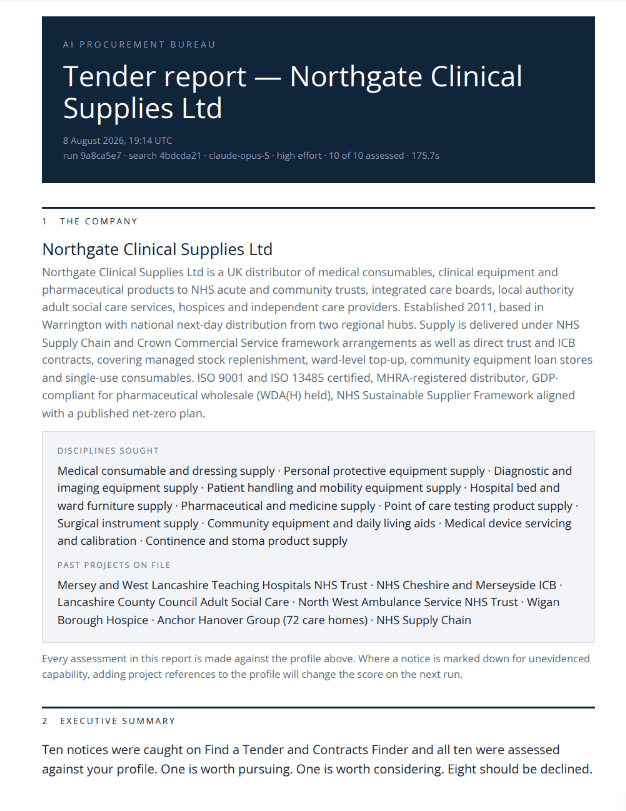
The report opens with you
The masthead carries the provenance — the run and search ids, which model read the notices, at what effort, how many of the catch were assessed, and how long it took. You can tell what produced the document from the document.
Section 1 is your own company profile, restated. It is there so that every judgement further down has a visible basis: when a notice is marked down for capability you did not evidence, this is the page that shows what you told it.
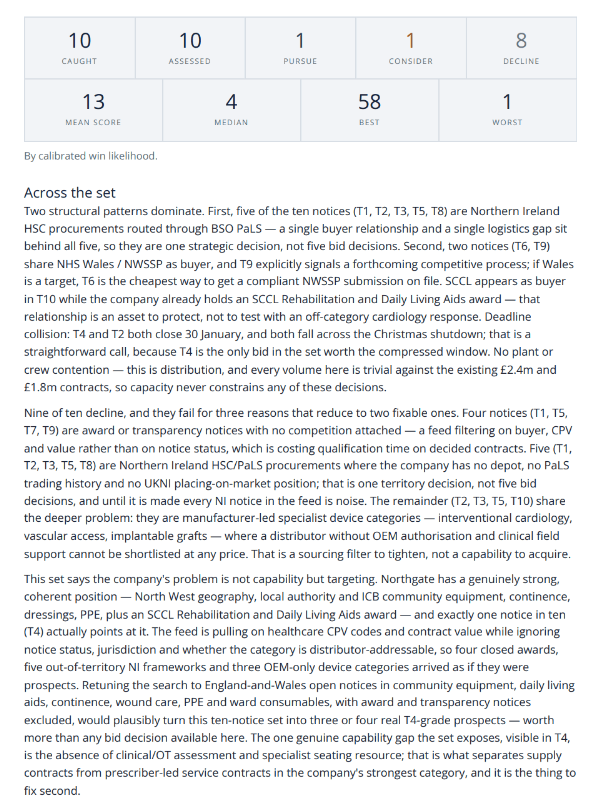
Then the shape of the set
Two strips of figures, then the part that earns its keep: Across the set looks for the patterns that only appear when you read ten notices together — five of them routed through the same buyer, two of them signalling the same forthcoming competition, two closing on the same day over Christmas.
That is a different question from “is this tender any good”, and it tends to be the one that changes what you do on Monday.
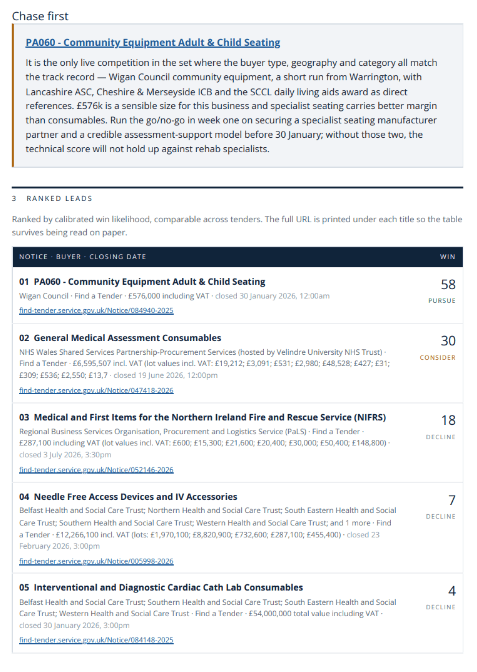
Ranked, with the URLs printed
Chase first pulls out the single notice to act on and says what to do about it. Then the full ranking: every lead, its buyer, its value, its closing date and its score, ordered by calibrated win likelihood.
The bare URL is printed under each title. Reports get forwarded, printed and read on paper, and a table of unclickable blue titles is no use to the person holding it.
Then one card per lead
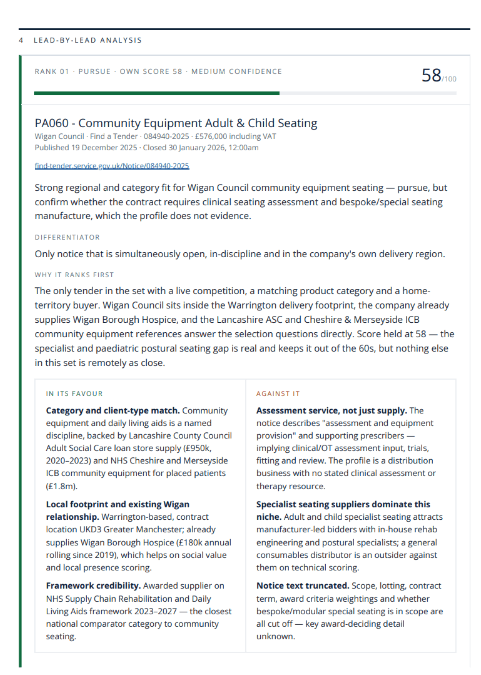
Each notice gets its differentiator, an explanation of why it ranks where it does, and two columns that argue with each other: what is in its favour, and what is against it. Then five factors — location, cost, resourcing, competition, timeline — the risks, and a viability judgement.
It is written to talk you out of things. You are about to spend real money and real bid-team weeks, and an honest decline is worth more than an encouraging maybe.
And the calibration, on one chart
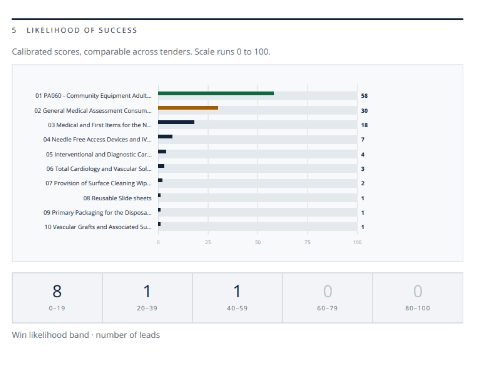
Every lead on one 0-to-100 scale, in five bands. This is the chart the second pass exists for: scores from ten independent readings are not comparable — an 80 from one and a 75 from another mean nothing side by side, because neither reading saw the other tender.
Putting the whole set in one context and re-judging it is what makes a bar chart of them honest. A sixth section then lists every notice caught that session, assessed or not, so you can see the width of the net the shortlist came out of.
The two ways to run one
By hand, or by itself.
Identical work and an identical report. The only difference is whether you were there, and that difference costs 2 tokens.
Run report
5 tokens
£5 a run
- Started by
- You, with the tab open
- Dates
- The publication window you typed
- If the balance is short
- The run stops before it starts. Nothing is spent, and the notices already scraped stay in your archive
- How many
- As many as you like
Auto schedule
7 tokens
£7 a run, no tab open
- Started by
- Nobody — it fires on its own clock
- Dates
- The rolling look-back window, recomputed every run (1–90 days, 14 by default)
- If the balance is short
- The firing is skipped and nothing is charged. You get one email about it, not one per firing, and the schedule stays live
- How many
- 5 search profiles on a schedule, up to 4 firings a day each
Why a schedule costs 2 tokens more
The work is the same work. What you are buying is not having to be there: a run nobody is watching has to hold its place across many separate wake-ups and pick up its own failed legs, and it cannot lean on a warm cache the way a run in a single sitting can. 2 tokens.
As many searches as you like
Keep up to 25 saved search profiles — one per sector, per region, per buyer you are chasing. Run any of them by hand as often as you want, and put any 5 of them on a schedule. Every run, either way, ends the same: a full report and an email with the PDF attached.
Only the reading is charged
Driving the register, building your corpus, searching it, ranking the set, rendering the PDF and the .docx and sending the email are all free. The tokens go when the assessment starts — after the scrape, so a short balance costs you nothing. A run that finishes having assessed nothing at all is refunded in full, automatically. The full pricing page has the rest.
Try it on your own filters.
Your first search is on us — 5 tokens land the moment you open an account, which is exactly one run of everything above. No card, no subscription, and nothing else to cancel if the report is not worth 5 pounds to you.